What Is DNS Filtering, and How Does It Work?

For K-12 IT teams, DNS filtering is the first and fastest line of defense between students and the open internet, screening out malicious, inappropriate, and out-of-policy sites before a single page ever has the chance to load, and forming the baseline most districts rely on for CIPA compliance.
Each time a student attempts to visit any web address on their school network or school-issued device, a decision is made behind the scenes: Should this be allowed or blocked?
In most cases, the tech doing the heavy lifting in that decision-making process is a DNS filter, and it's the foundational first layer of internet protection for all students.
For K-12 districts, DNS filtering is typically the baseline needed to maintain CIPA compliance, though this filter method is best paired with content-aware filtering for maximum coverage.
What is DNS filtering?
DNS stands for "Domain Name System." Think of it as a directory for the entire internet. When someone types a specific web address into a browser, like "linewize.com", DNS translates that name into the numerical IP address that computers use to find and connect to the right server.
DNS filtering solutions layer a policy decision onto the lookup process. Instead of simply returning the address for all requested domains, the DNS filter checks each request against a set of rules before deciding whether it's okay to let someone through to “access the site they’re attempting to visit.
In the K-12 setting, the rules that govern DNS filters are usually based on:
-
District policies: District-wide rules about what site categories are allowed or restricted for certain users or devices
- Content categories: Broad groupings like "adult content" or "social media"
- Threat intelligence: Continuously updated data on malicious or compromised domains
- Blocklists and allowlists: Specific domains that are blocked or permitted
If the DNS filter finds that a requested domain is allowed, the lookup goes through normally and the person can visit the page. If it's blocked, the DNS filter intercepts the request and redirects the user to a block page, before a connection to the site is made.
How DNS filtering works, step by step
A typical DNS filtering sequence looks like this:
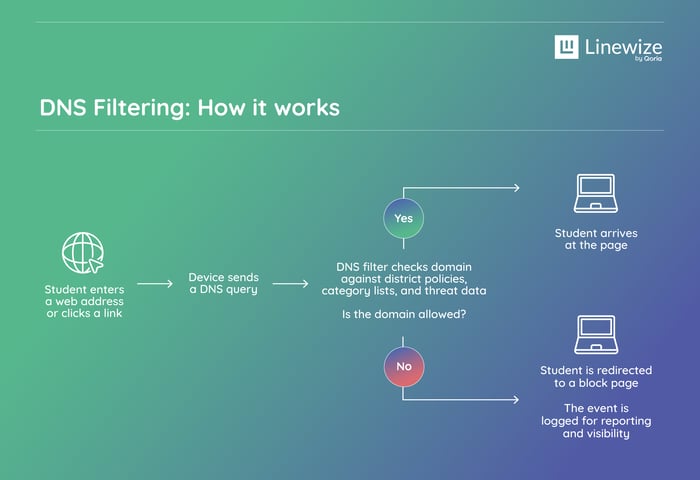
The decision of whether or not to block the content happens before the browser can even establish a connection to the site. If a domain is blocked, the student's device never gets far enough to load any content from it, keeping them safe and secure.
What DNS filtering can (and can't) restrict
DNS filtering is fast and effective at blocking access to certain domains. Categories that schools commonly choose to filter include:
- Malware and phishing domains
- Known anonymizers, proxies, and VPN services
- Gambling, adult content, and self-harm related content
- Social media platforms
The benefit is that because the DNS filter checks each site at the domain level, this process is efficient. DNS filters don't have to look at every single page to make a decision. However, this is also their biggest limitation. A domain that's generally approved may still host individual pages that violate district policy, and DNS filters won't catch that.
DNS filtering vs. content-aware filtering
DNS filtering, on its own, was extremely helpful in the earlier days of the internet, when most harmful or distracting content lived on blockable domains. But today's internet doesn't work that way; inappropriate content can show up anywhere, and a filter that only checks at the domain level leaves safety gaps that IT teams have to chase down daily.
Content-aware filters provide the next layer of defense. Instead of stopping at the domain, they analyze the text and images on a page and then make a filtering decision based on the nature of the content.
Today, the strongest option for K-12 districts is to deploy a solution that uses both DNS and content-aware filter methods. DNS filtering is fast, and can catch a lot of known threats. For those pages that are approved at the DNS level, content-aware filtering then analyzes every page a student tries to visit, making a real-time, context-specific decision.
How DNS filtering supports K-12 schools
As the first level of protection, DNS filters play an important role in a district's digital safety strategy.
Safer online learning
With DNS filters, IT teams can apply consistent, age-appropriate policies, quickly covering millions of domains. Policies can also be set by user group, giving elementary students, high schoolers, and district staff different levels of permission.
CIPA compliance
For districts receiving E-rate discounts, the Children's Internet Protection Act (CIPA) requires content-blocking technology, and DNS filters are one of the most accessible ways to comply with CIPA. DNS filters are just one prong of a CIPA-compliant approach, however, and districts will still need to do things like provide education, create policies, and monitor students' online activities.
Protects school networks and devices
According to the U.S. Department of Education, school districts experience an average of five adverse cyber incidents every week. DNS filters help defend schools against attacks by cutting off connections to malicious websites (where malware can infect devices), phishing pages, and other harmful domains.
Off-campus device coverage
1:1 programs mean students take their devices home with them. Filters that only apply to the school network leave students vulnerable when they exit campus. Cloud-based DNS filtering fills the gap, maintaining consistent safety policies no matter where a student is located.
DNS filtering is a foundational layer of student safety and district security. However, the fact that it only works at the domain level means DNS filters are best layered with content-aware filtering tools that can keep up with the modern landscape of digital threats and filter workarounds. For a more complete student safety approach, districts should look into adding classroom management tools, parent resources, and digital student threat monitoring for comprehensive digital safety.
DNS filtering FAQs
Talk to us
Talk to an expert or book a demo. Our cyber safety experts are waiting to help.
Stay in touch
Sign up for our newsletter to get all the latest product information.