Cloud-Based Content Filtering vs. Hybrid Filtering

K-12 districts have options when it comes to web filtering: on-premise, cloud-based, or hybrid. For many IT leaders, the comparison that matters most is cloud-based vs hybrid because many students use devices both on and off campus.
Choosing cloud-based or hybrid filtering will depend on your district's device program, policy complexity, and how (and where) students use their devices.
Cloud-only filtering became the norm for most districts, as opposed to on-premise filtering, when it became commonplace to send school-issued devices home with students. As more schools navigate BYOD (Bring Your Own Device) programs, and an increase in personal device usage by both students and staff during the school day, many IT leaders are finding gaps in cloud-only filtering that would have been covered by an appliance.
Hybrid filtering emerged as a solution.
Here's how each option works, the pros and cons of each, and how to select the right one for your district.
What is cloud-based content filtering?
Cloud-based filters assess web requests through remote cloud infrastructure, rather than through a physical appliance on your network. This means that there is no on-premise hardware to maintain, and coverage follows devices off campus.
"Cloud-based filtering" can refer to:
- Pure DNS filtering: This method checks requests at the domain level before a connection is made. DNS filters are fast and simple to use, but they only work at the domain level, so they can't inspect the content on a page, which creates a level of risk. (Content-aware filters are the only type of filters that can analyze content to determine whether it's safe.)
- Cloud-managed filtering with endpoint clients or browser extensions: This method works on the device itself and is managed from a cloud platform. This approach enables more granular filtering, including the real-time content analysis just mentioned, without requiring on-premise infrastructure.
How cloud-based filtering works
Here's how a cloud-based filter operates:
- A student opens a browser and enters a web address or clicks a link.
- The device sends a DNS query, or the endpoint client intercepts the request.
- The cloud filter checks the domain (and in the case of a cloud-managed filter, it will check the content as well).
- Access is allowed or blocked. If the latter, the student is redirected to a block page.
- The event is logged for reporting and visibility.
Benefits of cloud-based filtering
- On and off campus protection: Allows you to apply the same school internet filtering policies whether the device is on or off-site. This is particularly useful for 1:1 schools.
- Fast investigative reporting: Provides faster reporting than on-premise solutions, as it eliminates the need for an appliance to process large volumes of data. Faster reporting means faster resolution on issues.
- Fast internet access: Gives students and staff fast access on any device. The simplification of authentication of users also makes for a more streamlined process.
- Fast deployment: Removes the need for the installation of complicated hardware, or hands-on IT hours, to get it deployed and working.
- Lower IT maintenance: Filtering maintenance time is reduced with cloud hosting, giving valuable hours back to district IT teams.
- No capital expenditure: Eliminates the need to purchase and maintain expensive servers upfront. Cloud filtering allows you to subscribe for exactly what you require over time.
- Scalability without new appliances: The cloud is a dynamic solution that allows your district to expand or contract quickly, ensuring optimization for current usage.
- Always latest edition: Cloud filtering will always run the latest version, without the need for running manual updates.
- No bottlenecks: Cloud filtering happens at the device level, meaning activity is distributed across all devices, helping to reduce bottlenecks and remove chokepoints.
- Security: Data in the cloud is encrypted and held on remote, physically secure sites.
- Back-up of data: Cloud services are more likely to have easy recovery of any lost data.
- Simplified content filtering: Some solutions allow you to achieve real-time, content-aware filtering without the complexity of man-in-the-middle (MitM) decryption, certificates, or exceptions.
Limitations of cloud-based filtering
Cloud filtering offers many benefits, but it can also fall short of full safety coverage in the modern era, especially in complex K-12 environments. Limits of cloud-only filters include:
-
Personal and unmanaged devices: Cloud filtering usually requires an endpoint client or extension installed on each device. BYOD devices, guest users, and unauthenticated devices fall outside of those parameters.
-
IoT and network-connected devices: Smartboards, printers, and other IoT devices that connect to the school network can't run a filtering client and so they are unprotected.
-
No traffic inspection: Because cloud filtering doesn't sit on the network, it can struggle to detect and block VPN and proxy tools that students use to bypass the filter.
-
Outage exposure: If the cloud filtering service experiences an outage, there is no local fallback, and the network is left vulnerable until service is restored.
What is hybrid content filtering?
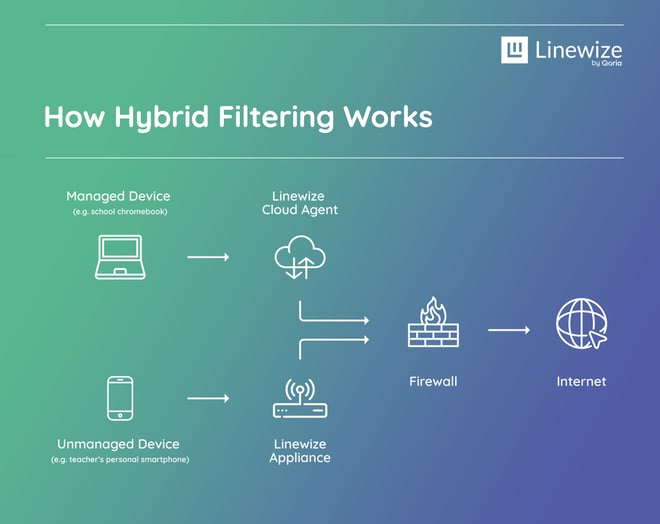
Hybrid filtering combines the benefits of cloud-based filtering with a physical gateway appliance, installed on-site. Together, the two work together from a single management platform to provide total security.
How hybrid filtering works
Here's how a hybrid filter operates:
- IT sets all filtering policies within the cloud application.
- Managed devices are then filtered in the cloud.
- Unmanaged devices are filtered through the on-site appliance.
- The highest filtering rules will apply for any guest or unmanaged device on the network, unless the user authenticates.
Benefits of hybrid content filtering
- No coverage gaps: No matter where a device is, and regardless of whether it's a managed or personal device, everything is covered. The cloud filter handles all managed devices, and the inline appliance covers the rest. Plus, devices are still protected if the internet goes out.
- Reduces reliance on your firewall: Some districts attempt to use firewalls as a back-up to their cloud filter, but they cannot achieve the same granularity in policies. This goes beyond a firewall's intended purpose, which is to protect the network perimeter, and can make reporting and policy management cumbersome.
- Defends against VPNs and proxies: Because the appliance sits inline on the network, it can inspect all traffic (even if it's encrypted), often blocking VPN and proxy tools before they can be used to bypass filtering.
- Consistent policies and unified reporting: Hybrid filtering allows IT teams to work out of one platform and one set of policies, for both the cloud and the appliance - ensuring the same coverage across all device types and locations. This keeps protection consistent and reduces the risk of human error caused by people pulling information from different places.
- IoT and smartboard coverage: The inline appliance filters all network-connected devices, including those that can't run a client, like smartboards and printers.
- Compliance with Active Directory sync: The appliance syncs with Active Directory, giving IT full visibility into all ports and traffic for unmanaged devices. This makes it easier to maintain CIPA compliance across the whole network.
Cloud-based vs. hybrid filtering: How to choose the right method for your district
There is no universal "best" answer to the question of which filter to choose. Here's some guidance on how to think through your decision.
When cloud-based filtering is the right choice
Cloud-only filtering is a good fit for districts that:
- Run a mostly managed, 1:1 device environment with little to no BYOD
- Need fast deployment
- Need to scale quickly
- Are earlier in their filtering journey and want an accessible starting point
If nearly every student uses a school-managed device and personal devices on your school network aren't a big concern, cloud-only filtering may be a strong choice. This is a common starting point for districts with smaller teams or limited bandwidth to manage additional hardware.
Real-world scenario: Take a district with 1,700 students and 500 wired desktop PCs. They are planning to roll out 400 Chromebooks in the near future, with more planned in the years to come. The district wants fast deployment for the new devices, filtering that works on- and off-campus, and the flexibility to pilot the rollout with one grade before expanding. With significant changes underway and a growing device fleet, cloud-only filtering offers the scalability and rapid deployment to fit this rollout.
When hybrid filtering is the right choice
Hybrid filtering is usually the better fit if any of the following applies to your district:
- You support BYOD or unauthenticated users on the school network
- Smartboards, printers, and other IoT devices need filtering
- You need to defend against VPN and proxy bypass attempts across traffic
- A 1:1 program calls for consistent coverage, no matter where a device is located
- You want to ensure the same coverage when staff or students connect personal devices to the school network
- You want unified reporting across all device types
- You need a failsafe in case cloud services experience an outage
For most mid-to-large K-12 districts, hybrid filtering provides superior, more comprehensive coverage without significantly adding to overhead.
Real-world scenario: A district has 40,000 students, district-wide 1:1 Chromebooks, and several hundred on-site PCs. The team is stretched thin, maintaining an on-premise filter and working to address other IT priorities. They need fast deployment and flexible filtering both on- and off-site, and they want an extra layer of security, given the size of the district. A hybrid filtering setup works well here. Cloud reporting reduces the burden on staff and allows district-wide reporting. The inline appliance is the backup layer, giving the added security that no device will ever go unprotected.
Note: Linewize's gateway appliance ships pre-configured and is ready to go once plugged in, resulting in a minimal setup lift.
At a glance: Cloud-only vs hybrid
|
Cloud-only |
Hybrid |
|
|
Deployment and setup |
Fast; no hardware required |
Appliance ships and plugs in immediately |
|
Hardware requirements |
None |
One gateway appliance |
|
Cost structure |
Subscription, with no upfront hardware cost |
Subscription and appliance cost; may qualify for E-rate or grant funding |
|
Scalability |
Highly scalable |
Highly scalable |
|
Off-campus coverage |
Yes, for managed devices |
Yes, for managed devices |
|
Personal device/BYOD coverage |
Limited |
Full; appliance covers all on-network devices |
|
Visibility |
Domain and page-level for managed devices; limited for unmanaged devices |
Full visibility into all devices |
|
Outage protection |
No |
Appliance serves as automatic backup |
|
IoT coverage |
No |
Full |
|
VPN/proxy defense |
Partial |
Strong |
FAQs
Do schools need both cloud-based and hybrid content filtering?
No, because hybrid filtering includes cloud filtering. When you choose a hybrid solution, you get both cloud filtering for managed devices and an on-premise appliance for everything else.
Is cloud-based content filtering more secure?
Cloud filtering stores and processes data on encrypted, physically secured remote servers, which can be more secure than on-site infrastructure. Hybrid adds an extra layer of protection and gives broader coverage overall.
Is hybrid filtering harder to manage for school IT teams?
Not at all. With Linewize Filter, both the cloud and appliance layers are managed from a single dashboard. The appliance itself requires minimal setup, and there is no ongoing maintenance beyond what a cloud filter requires.
Can cloud-based filtering handle large schools?
Yes, with some limitations. Large districts with Bring Your Own Device (BYOD) programs, IoT devices, or unmanaged devices may have coverage gaps that require a hybrid approach to address.
How reliable is cloud-based filtering during an unstable internet connection?
Cloud filtering depends on internet connection to function. If the connection is unstable, a cloud-only solution may not be able to protect students. In a hybrid setup, the on-premise appliance continues filtering all on-network traffic, even when the internet connection is unreliable.
Talk to us
Talk to an expert or book a demo. Our cyber safety experts are waiting to help.
Stay in touch
Sign up for our newsletter to get all the latest product information.